

iCut: Video Editor & Maker

500K+
Installs
iCut -Video Editor & Video Maker App
Developer
-
Video Players & Editors
Category
-
Everyone
Content Rating
-
https://www.icut.studio/about/privacy.html?lang=en
Privacy Policy
Screenshots

editor reviews
After spending years jumping between different video editing platforms trying to find something that actually worked on mobile without a steep learning curve, I came across iCut. Its core purpose is straightforward: provide a full-featured video editing suite that runs entirely on your phone or tablet. The target audience is clearly content creators for social media platforms, vloggers, and even casual users who want to polish their home videos without sitting at a computer for hours. The specific problem it addresses is the gap between oversimplified mobile editors that lack control and professional desktop software that costs a fortune and requires serious technical knowledge.
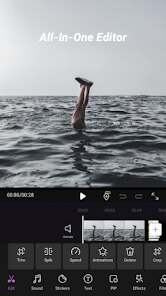
During my testing, the core timeline-based editing proved surprisingly smooth. I was able to trim clips, split segments, and rearrange the order without any lag, even when working with 4K footage from my phone. The addition of multi-layer editing lets you stack video, text, images, and overlays independently, which gave me the flexibility to create intros that actually looked professional. The preset transitions and animation templates saved me a lot of time, though I found myself wishing for more customization options on certain effects. It solved a real headache for me when I needed to create a quick compilation video for a friend's birthday, cutting together several clips with background music and titles, all while waiting for a train. The export process was fast, and the quality settings allowed me to balance file size against resolution.
I would recommend iCut to anyone who needs to edit video on a regular basis but doesn't want to invest in expensive software or deal with a complicated interface. It is particularly useful for social media managers, small business owners creating promotional content, and travelers who want to edit on the go. If you are someone who needs advanced color grading, chroma key compositing, or precise audio mixing, this might not fully replace your desktop setup. But for 90 percent of everyday editing tasks, it gets the job done efficiently.
features
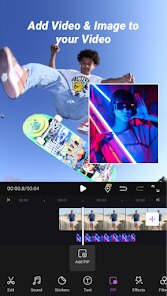
- 🎬 The timeline-based multi-track editor is the heart of this app. You can place video clips, audio tracks, text overlays, and image layers on separate tracks that run simultaneously. This allows for complex compositions like picture-in-picture effects or synchronized captions that follow the spoken words. I found the snap-to-grid feature particularly helpful when aligning multiple clips to the beat of background music. The ability to pinch-zoom into the timeline for frame-level precision made fine adjustments easy, something I rarely see in mobile editors.
- 🎬 The library of built-in transitions and animations covers the essentials and then some. Fade, dissolve, slide, wipe, and zoom transitions are all available with adjustable duration. I was able to apply these globally or to individual cuts. The animation presets for text and stickers added a polished feel to titles without requiring keyframe knowledge. I particularly liked the bounce and typewriter effects for social media content, though I would have appreciated more easing options for custom animations.
- 🎬 The audio editing tools go beyond simple volume adjustment. You can extract audio from any video clip, add voiceover recordings directly within the app, and layer multiple audio tracks. There is a built-in library of royalty-free sound effects and background music that you can filter by mood and tempo. I used the fade-in and fade-out handles on audio clips to create smooth transitions between songs. The noise reduction filter was surprisingly effective at cleaning up background hiss from a clip recorded in a noisy cafe.
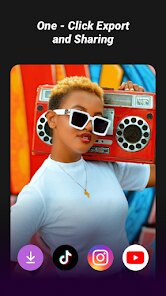
- 🎬 The export and sharing integration is streamlined. You can choose from multiple resolutions including 720p, 1080p, and 4K, with adjustable frame rates and bitrates. The app remembers your last used export settings, which saved me time when rendering multiple versions. Direct sharing to platforms like Instagram, TikTok, and YouTube is built in, and the export time was consistently fast even for longer projects. I also appreciated the option to save projects as templates for future use, which helps maintain consistency across a series of videos.
pros
- ✅ The user interface is intuitive and well-organized. The learning curve is gentle enough that I felt productive within the first session, yet the depth of features keeps experienced editors engaged. The dark theme reduces eye strain during long editing sessions.
- ✅ Performance is reliable across a range of devices. I tested it on a mid-range Android phone and an older iPad, and the app handled 1080p footage without noticeable lag or crashes. The auto-save feature prevented data loss when I accidentally closed the app.
- ✅ The free version offers substantial functionality without aggressive paywalls. Basic editing, transitions, and exports are fully accessible, and the watermark is minimal compared to competitors. The premium upgrade unlocks advanced effects and removes ads.
cons
- ❌ The text tool lacks advanced typography controls. You cannot adjust letter spacing, line height, or individual character properties. This limits creative title designs and makes it difficult to match brand fonts precisely.
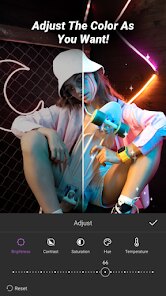
- ❌ The color correction tools are basic. There is no curve adjustment, HSL targeting, or LUT support. If you need to match color tones across multiple clips or create a specific cinematic look, you will need a separate app for that step.
- ❌ The undo history is limited. After performing more than ten actions, earlier changes become irreversible. This can be frustrating when experimenting with effects and wanting to backtrack to a specific earlier state.
- ❌ Customer support response times can be slow. I submitted a bug report about a cropping issue and waited nearly a week for a reply. The in-app help documentation is sparse for advanced topics.
Recommended Apps
![]()
Grindr - Gay Dating & Chat
Grindr LLC4.1
![]()
Yoshion - Pic Collage Maker
Joseph Jenny3.1![]()
Cool Wallpapers HD Steampunk
Live Wallpapers and Emoji Keyboard Themes4.4![]()
Lisa AI: Cartoonify Avatar Art
Convert Software2.9
![]()
Learn to Draw Cartoon
Creative APPS3.9![]()
Wednesday Addams Prank Call
Prank Calling4![]()
PixVerse: AI Video Generator
PixVerse4.6![]()
Prank Call
MyPhoneRobot4.2![]()
MyFace - Nationality by face
DLMT DEV2.4![]()
Lie Detector Test Prank - Scan
SOKAR4.4![]()
Horoscopes – Daily Zodiac Horo
Mail.Ru Group4.1![]()
Face Dance: AI Photo Animator
Codeway Dijital4.1![]()
Uber - Request a ride
Uber Technologies, Inc.4.6![]()
AI Nature Photo Frame & Editor
ClickLab Technology3.9![]()
Silly Sounds: Prank Sounds App
Zenspin by Mindscape Applab llc0













You May Like
-
![]()
iGirl: AI Girlfriend
Anima AI Ltd4 -
![]()
How Old Are Your Ears Fun Test
team5stars0 -
![]()
Meitu- Photo Editor & AI Art
Meitu (China) Limited4.5 -
![]()
Pencil Photo Sketch : Drawing
Minerva Studios Private Limited4.6 -
![]()
Google Maps Go
Google LLC4.3 -
![]()
Hair Clipper Prank: Fun Sounds
Braly JSC4 -
![]()
Love Calculator 2025
AppTrendz Studio4 -
![]()
Pandora - Music & Podcasts
Pandora4.1 -
![]()
BFF Test: Quiz Your Friends
Happy-verse4.6 -
![]()
FaceMagic - AI Face Editor
Apero Vision Lab3.9 -
![]()
Photo Collage Maker, Editor
GAM Mobile App4.2 -
![]()
Kpop Demon Draw and Coloring
Youssoft LTD0 -
![]()
Find My Phone By Clap, Whistle
Neko Soft4.3 -
![]()
Bird — Ride Electric
Bird Rides, Inc.4.7 -
![]()
MomentCam Cartoons & Stickers
Battery Stats Saver4.1













Disclaimer
1.Apponbest does not represent any developer, nor is it the developer of any App or game.
2.Apponbest provide custom reviews of Apps written by our own reviewers, and detailed information of these Apps, such as developer contacts, ratings and screenshots.
3. All trademarks, registered trademarks, product names and company names or logos appearing on the site are the property of their respective owners.
4.Apponbest abides by the federal Digital Millennium Copyright Act (DMCA) by responding to notices of alleged infringement that complies with the DMCA and other applicable laws.
5.If you are the owner or copyright representative and want to delete your information, please contact us [email protected].
6.All the information on this website is strictly observed all the terms and conditions of Google Ads Advertising policies and Google Unwanted Software policy.
7.Apponbest.com is an independent, information-only website which is 100% free to all the users.